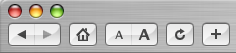
 Dave Winer comments on Apple's decision not to include a "Home" button in the default toolbar of Safari. As pictured above it can easily be put back by choosing Customize Address Bar... from the View menu. I've often wondered about the choice but don't often think of it because it's solved in the first few seconds I use Safari and never an issue again.
Winer goes on to bash Safari. I would have to strongly disagree. I've tried other browsers and there just isn't a single browser that comes close. Firefox certainly isn't bad but it just misses the mark as far as a tool to be used by frequent web publishers. The big feature that no others have is "Check Spelling as you type". Given that every other (non-web) application in use every day does this it is amazing that Apple is the only company that has figured it out. The same feature used to drive the choice of email clients but everybody who is anybody in the email game anymore knows you don't wait until somebody hits "Send" to check spelling, you do it as they type.
6 Comments
You're awesome. Thanks a
You're awesome. Thanks a lot.
home button
I can't even find the "view menue" let alone figure out how to add it. Every time I look for assistance on the ipad I get messages from young people who forget there's older unexperienced people in the world and they don't care to try and explain so we understand.
Home Button
Thank's a lot!
thanks for the post...it was
thanks for the post...it was exactly what i needed! AWESOME
How do I find the view button
How do I find the view button or tab to change to this safari home page
Thank you!
I should have found that myself :P Thank you.
Franz
"Be the change..."