imagecache

Nov
30
2008

Using Acquia Drupal as an image processor?

pipeline_in_trench.jpgCatching up on some blog reading today I picked up on a thread Dave Winer's been writing about. He's using ImageMagick to resize images and produce thumbnails. Throughout the thread I kept thinking this sounds a lot like a standalone version of the Drupal imagecache module. Perhaps, I thought, the answer could be setting up a Drupal site to do the conversion. Nah that's too much I said to myself.

However, the more I thought about it the more sense it made. Then I got to today's post where Winer mentions a small web server for doing the work. "I'm still bugged that: 1. It seems slower than it should be. 2. A window flashes every time it creates a thumbnail," Winer says in the post. OK this is the prefect situation for building a one-off clone of imagecache. The next paragraph says, however, that he doesn't want to build it in PHP as it's another language to pick up.

While heating up some naan for my lunch the plan came together. Build a small website using Acquia Drupal and have imagecache do the work for you. The beauty of the solution is that it doesn't take learning PHP. It is a PHP-based solution of course, but one with no coding necessary. So why use Acquia Drupal specifically? It has a couple of advantages in having the necessary modules already bundled with it. The modules are all available on Drupal.org but for somebody who hasn't setup a Drupal site before having them all together is handy. There's also a good Getting Started guide that makes it easy for users to get a site setup.

Jan
31
2008

Quickly adding imagecache and lightbox to posts on Drupal sites

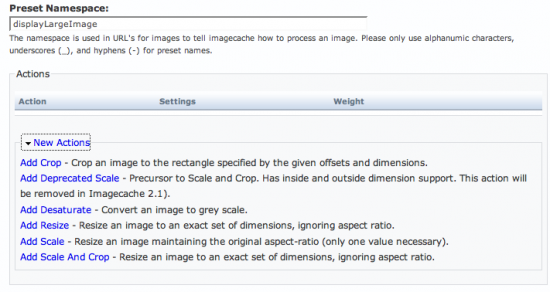
Imagecache options screen shot

Following up on yesterday's post this is a quick and dirty guide to adding images to blog posts using imagecache and Lightbox v2. The effect of these together is to create an image like the one in this post. When clicked the image will display in an overlay on this page thanks to lightbox. Imagecache handles making a static copy of the image available and resizing the image to provide several predefined sizes.

It is possible to do similar things in much better ways. For example creating an image field and a template for displaying posts that include the image. This method is a quick and dirty method using a minimum of additional modules. With Drupal 6 the FlexiFilter module will make this method even simpler.

The first step is to setup the necessary modules (imagecache and lightbox v2). The imagecache handbook page has some information about setting up presets for imagecache. The latest version of imagecache has new settings that deprecate some of the old settings. See the image in this post for a glance at what is in the newest CVS version.

Syndicate content